 Power
Power
From the Power screen, you can view and configure the drive power settings as follows.
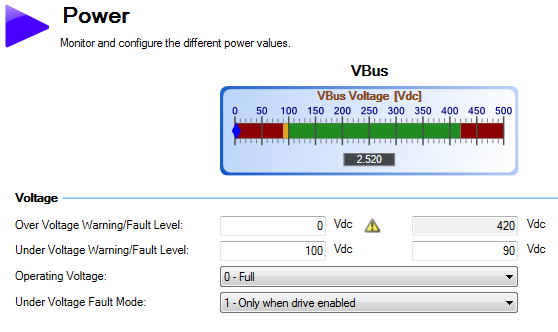
| Button or Dialog Box | Description | Parameter |
|---|---|---|
|
VBus |
Reads the current DC bus voltage. |
|
|
Over Voltage Fault Level |
Reads the over voltage fault level. |
|
|
Under Voltage Fault Level |
Reads the under voltage fault level. |
|
| Operating Voltage | Sets the operating voltage. | VBUS.ACNOMINAL |
|
Under Voltage Fault Mode |
Sets under voltage mode. |
See Regeneration for more information about regen resistors and sizing regen resistors.
Operating Voltage
Operating voltage can be selected by the user to allow 480VAC drives to work on 240VAC input supplies.
The VBUS.ACNOMINAL parameter has an effect on the following voltage-thresholds:
- DC-bus over-voltage threshold (see VBUS.OVFTHRESH).
- The regen-resistor enable/disable voltage thresholds.
- The inrush-relay enable/disable voltage thresholds.
A power-cycle is needed after changing the value and saving the parameter on the NV memory of the Drive, since the voltage thresholds mentioned above are read during the boot-sequence of the drive.
|
Stay Connected with Kollmorgen       
|
Copyright © 2018 Kollmorgen |

|